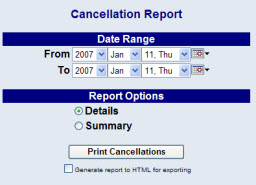
The Cancellation report shows all reservations originally booked for a specific date range that have since been canceled.
Click the Reports icon from the Action Bar, to open the Reports Area.
Then select Cancellation from the Room Reports section of the Reports Area.
Select the Date Range for the report. This range identifies the dates for which the original reservations were booked, NOT for the dates they were canceled.
Select the options you want for the report. These include:
When finished, click Print Cancellations.
Once generated, the report shows either the summary or detail information identified above, depending on your report option selection.
By default, the report is generated in PDF form and opens in a separate browser window. From there you can select to save or print the report, among other options. You can, instead, check the Generate report to HTML for exporting checkbox to generate the report in HTML instead of PDF.